








Run LTX 2.3 GGUF under 16GB

This tutorial explains how you can run LTX 2.3 GGUF locally with just under 16GB of VRAM. By the end, you will be able to generate synchronized video and audio content entirely from your own machine.
What is LTX 2.3?
LTX 2.3 is a 22B parameter model by the Lightricks team that produces both visuals and sound in one or more generation stages. It's the latest in the LTX family of video models that comes with two major variants, 'dev' and an 8 Step 'distilled' version.
This new model makes it useful for creators who want a complete audiovisual workflow in a single tool. Lightricks also included 3 LoRAs along with 3 variants of video upscalers.
Model features and capabilities
- LTX 2.3 22B Dev & LTX 2.3 22B Distilled.
- Community Model Size: 8.28GB+ GGUFs.
- Official Model Size: 46.1GB BF16 and 29.1GB FP8.
- Text to Video, Image to Video, Audio to Video, Video to Video, Audio to Audio and more.
- Distilled LoRA for 8 Steps.
- IC LoRA supports 3 controlnets in 1: Pose, Depth and Canny.
- IC LoRA Motion Track Control.
- Up to 4k native resolution.
- Portrait mode support.
- 20 second video generation.
- 50 frames per sec.
- Better prompt adherence.
- Improved video detail.
- Improved audio and lip syncing.
- Supports 9 Different Languages:
- English
- German
- Spanish
- French
- Japanese
- Korean
- Chinese
- Italian
- Portuguese
Requirements before running LTX 2.3
- GPU VRAM
- Minimum: 8GB Reddit user reported
- Recommended: 12GB
- System RAM
- Minimum: 16GB
- Recommended: 32GB
- SSD/HDD Storage
- Minimum: 30GB
- Recommended: 50GB+ (for multiple variants)
While there's a number of ways you can run AI locally, we'll be using ComfyUI in this tutorial. Assuming that you're reading this, you would already have ComfyUI and all of its dependencies installed.
If not, please check their official Github and set up the portable version (recommended) or check ComfyUI's official website if you prefer. There's also Wan2GP.
Installing LTX-2.3 on Your Local Machine
The easiest way to run LTX-2.3 is through ComfyUI, which handles model loading and pipeline setup automatically. There's various operating systems and ways to run ComfyUI but for now we'll focus on Windows + the portable version of ComfyUI.
- Update your ComfyUI install: You must update your ComfyUI to v0.16.0 and over if you haven't already. Version 0.16.0 has the support required to run LTX 2.3.
- Update through bat file (recommended): Run the 'update_comfyui.bat' usually found in 'path\to\your\ComfyUI\update' folder.
- Update through ComfyUI manager: Open your ComfyUI, click on 'Manager' in the top right then click 'Update ComfyUI'.
- Download model weights: Remember to check your hardware capabilities before downloading anything. We'll focus on GGUF models for this one.
- Download GGUF (distilled version recommended for 8 steps) and place in 'path\to\your\ComfyUI\models\unet' folder.
- Download the 9.45GB Gemma text encoder and place in 'path\to\your\ComfyUI\models\clip' folder.
- Download the text projection model and place in 'path\to\your\ComfyUI\models\text_encoders' folder.
- Download both audio and video VAEs (distilled version recommended) and place in 'path\to\your\ComfyUI\models\vae' folder.
- Download the 3 upscale models and place in 'path\to\your\ComfyUI\models\latent_upscale_models' folder.
- Install custom nodes: When you add the workflow you might see a popup for missing custom nodes. You can automatically install them through the manager, but some nodes need specific requirements, so best to do it through Window's CMD terminal. All custom nodes go into 'path\to\your\ComfyUI\custom_nodes' folder. To install then setup requirements for most custom nodes:
- In CMD window use path\to\your\ComfyUI\custom_nodes>git clone https://github.com/user/name-of-custom-node.git'.
- Then go into the newly made folder, open up CMD again and then install requirements by doing path\to\your\ComfyUI\custom_nodes\name-of-custom-node>..\..\..\python_embeded\python.exe -m pip install -r requirements.txt. Install the custom nodes required:
- ComfyUI-GGUF
- ComfyUI-KJNodes
- Workflow and running your first generation: If everything is setup correctly the popup message should disappear. Use this Text to Video workflow to generate your first video.
Solving common issues
- Resolution errors: Width and height must be divisible by 32. Frame counts must be divisible by 8, plus 1 (so 9, 17, 25, etc.). If your settings do not match, pad the input with -1 values and crop to your desired output.
- Mat1 and Mat2 error: In ComfyUI, this error occurs when the incorrect clip is selected. Be sure to download the correct clip model.
- Distorted or discolored output: Your output might have a very off colored look to them where a lot of the visual information is missing. Be sure you're not using the distilled LoRA and the distilled model at the same time.
- Memory and OOM issues:
- Try
adding --disable-dynamic-vramto your run_nvidia_gpu.bat file if you're experiencing huge memory spikes. Users have reported having various other issues resolved by disabling the new dynamic VRAM argument. - For Image to Video workflows with two stages, drop your image resolution. Second stage upscale generation can eat up memory so try smaller resolutions.
- Try
Answers to common LTX questions
What does LTX stand for?
LTX is the name used for the AI video model by the Lightricks team. Although, it's not very clear what each letter stands for exactly, it could simply just be the name chosen for the model.
Is LTX AI free?
Yes, LTX is a free downloadable model you can run locally on your device. The team offers both free and paid plans for their models but as of LTX 2 the model is fully open-source.
What are the limitations of LTX AI?
Generating audio without speech will produce lower quality. Also getting sound effects correct can prove to be challenging. Another notable limitation is LTX 2.3 won't detail every single thing in your prompt however, prompting style does matter.
First impressions
For a model that does both audio and video in a single stage generation, it's reasonably fast. While the over all visual quality isn't as great in comparison to a two stage generation, I'd say it's a win for local users.
The Good!
Voices - LTX 2.3 really shines when generating voices. You can hear the emotion in the characters when you specify specific scenarios.
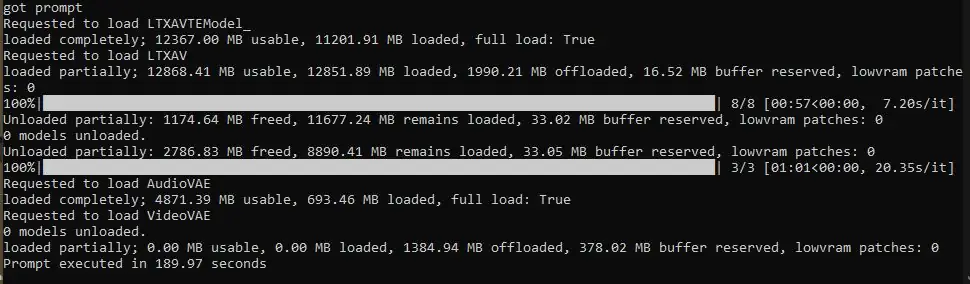
Speed - Another strength is its fast generation speeds. Considering the below screenshot is for a 10 second video of 24 FPS around 241 frames at 960 by 960, this puts LTX above Wan in terms of speed. I'm running a RTX 4070 TI Super 16GB VRAM with 48GB System RAM.
Quality - The quality is a real step up from Lightrick's previous models. I noticed there's less smudge during speech and general bodily movement. LTX 2 suffered from play dough-like smearing, especially when characters were seen talking.
The not so good...
Sound Effects - Speaking of audio, in terms of sound effects, this is the part which I disliked the most. Generated sound effects are not all there when compared to generating voices. There's usually a stretched out or harsh trapped in a tin can quality to them.
LTX 2.3 GGUF workflows
The Loner
A very large and intimidating rough-faced 37 year old man, heavy brow, sharp jawline, thinning hair receding deeply at the temples with a visible bald crown, tall and broad shouldered with a slight muscular build. He wears a long weathered extremely dirty and torn open brown trench coat, a heavy military style backpack strapped to his back, and carries a worn pump-action shotgun at his side. He strides aggressively and purposefully through a busy UK town centre at night, neon shop signs and streetlights reflecting off wet pavement. Dark gritty atmosphere. Shot on a 35mm camera from the late 1970s. Crowds of ordinary people part around him. He mutters rapidly under his breath directly ahead, then suddenly snaps his head sharply toward the camera with a deadpan expression and speaks directly into the lens. His voice is deep with a thick Russian accent. The camera is locked in a strict flat lateral side-on view, the man positioned in the left-center third of the frame, walking from right to left as the camera smoothly pans in perfect parallel tracking to match his stride, keeping him consistently framed at the same screen position throughout. His full body is visible from head to toe. The camera maintains this flat 90-degree side profile with zero rotation or drift. Nighttime cinematic lighting, shallow depth of field. At the moment he delivers his final line the camera rapidly punches in to a tight close-up of his face, holding on his deadpan expression as he finishes speaking. In a very deep Russian accented male voice, very fast and rushed muttering pace: "Scavengers. Trespassers. Adventurers. Loners. Killers. Explorers. Robbers. Yes. I am THE STALKER. ...Try explaining that to your date......." He then continues walking off screen.
Ancient Priest
An old ancient priest (from ages of empires) who is clean shaven with long white slicked back hair wearing a long white ancient robe and a royal blue sash that wraps around like a large scarf, he holds a large curved wodden staff in a shape of a candy cain whilst rhythmically chanting in a very fast pace sharp 1-2-3 rhythm: "Wolaloh Wolaloh, Highyoyoyoh Highyoyoyoh, Wolaloh Wolaloh, Highyoyoyoh Highyoyoyoh", the sleeve of the arm which holds his staff is rolled up, he's waving his staff around like an old lunatic, the setting is a modern village, his chanting is old and very raspy, there is an ambient rhythm that matches his chanting, the people in village are not impressed
Chrome Pyramid
A colossal, city-sized chrome pyramid hovers gracefully above an endless emerald forest at sunset. Its mirrored surfaces reflect warm golden and pink hues from the fading sky. The pyramid slowly rotates and then spins clockwise in place, shimmering with dynamic reflections that ripple across its smooth metallic facets. Below, the treetops sway gently in the wind, their canopy glinting with light from the pyramid’s reflections. The atmosphere glows with soft haze and volumetric sunlight, creating a breathtaking, surreal scene viewed through a cinematic wide-angle lens.
Banned Mermaid
Wide-angle close-up shot, POV GoPro selfie style, underwater. A woman in her late 20s with long dark hair floating weightlessly around her face. Crystal clear tropical ocean water, dappled golden sunlight rays penetrating from the surface above, creating god rays through the deep blue-green depths. Various small fish can be seen swimming along side her. She swims with effortless grace, her body naturally buoyant. The fish dart between her and the camera, catching glints of light.

Camera movement: Gentle floating motion with slight handheld wobble natural to underwater swimming, occasional fish swimming directly in front of the lens creating blur effects.

Audio: Muffled underwater ambiance, the distant sound of water currents, the soft clicks and pops of fish movement. Her voice, slightly distorted as if speaking through water but clear enough to understand, with an excited, the woman says: "I've JUST been banned from the surface....But never mind, these new gills are absolutely fantastic!"