







DarioFT Releases ComfyUI-Qwen3-ASR for Qwen3-ASR
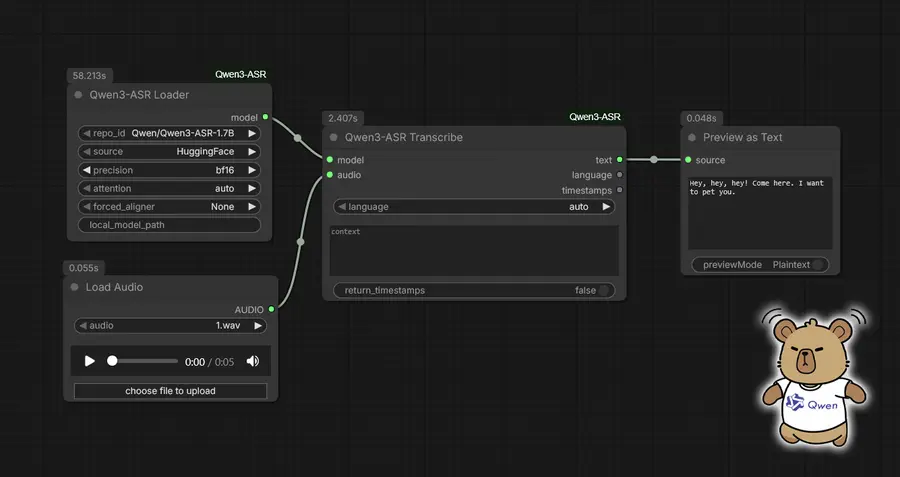
ComfyUI-Qwen3-ASR is a new custom node pack that brings automatic speech recognition to ComfyUI. It transcribes audio files into text across 52 different languages and dialects, making it a useful addition for anyone working with audio in their AI workflows.
Developer DarioFT created this tool to integrate Qwen3-ASR capabilities directly into ComfyUI's node-based interface. The nodes work alongside another custom node ComfyUI-Qwen3-TTS, allowing users to build complete speech-to-speech pipelines without leaving the ComfyUI environment.
Speech recognition features
- Support for 30 languages plus 22 Chinese dialects.
- Two model options: 1.7B parameters for higher quality or 0.6B for faster processing.
- Automatic language detection removes the need to specify languages manually.
- Optional word-level timestamps through a Forced Aligner feature.
- Batch processing handles multiple audio files in one run.
Content creators working on video, podcasts, or multimedia projects can use this tool to generate transcripts directly within their existing ComfyUI setups. The automatic language detection makes it practical for content in multiple languages, while the timestamp feature helps with subtitles and captioning workflows.
Setup and compatibility
Users can install the nodes through ComfyUI Manager by searching for 'Qwen3-ASR', which is the recommended method. Manual installation is also available through a standard git clone process. The package includes three main nodes: a loader for the ASR model, a single transcription node, and a batch transcription node for processing multiple files at once.
Models download automatically on first use and store locally in the ComfyUI models directory. The underlying technology builds on the Qwen3-ASR model from the Alibaba Qwen Team, running through the qwen-asr Python package. Users can choose between different precision settings including fp16, bf16, and fp32, depending on their hardware capabilities.
Get ComfyUI-Qwen3-ASR on GitHub. Screenshot Image by DarioFT.


