









AHEKOT Releases ComfyUI VNCCS Utilities
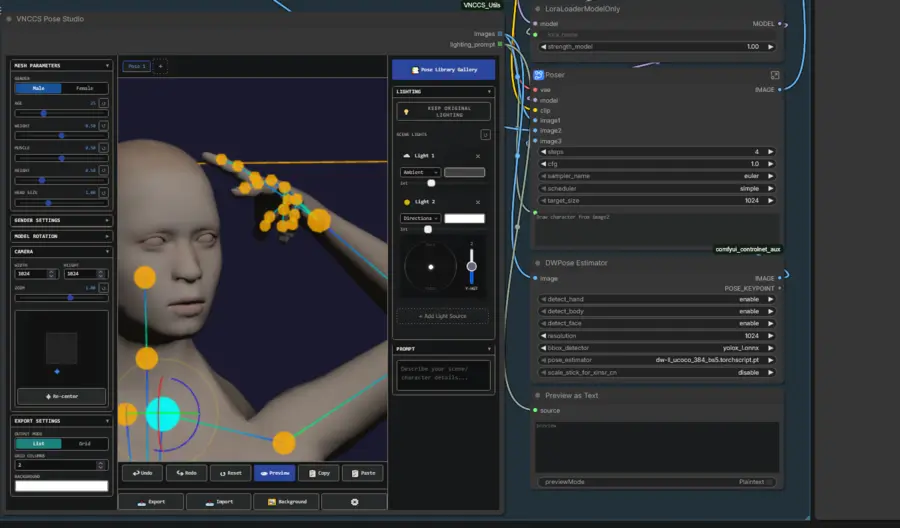
AHEKOT released version 2.1.0, tagged as 'EmotionStudio,' for the Visual Novel Character Creation Suite on January 10, coinciding with the availability of the ComfyUI VNCCS Utilities collection. The main project garnered recent popularity, reflecting significant community adoption for its pipeline designed to create consistent character sprites.
While the primary suite targets visual novel development, the utilities package extends these capabilities to broader ComfyUI workflows. This update introduces specific nodes for camera control, model management, and 3D posing environments.
Custom nodes & node features
- VNCCS Visual Camera Control: An interactive node featuring a visual widget for mouse-based selection of azimuth and distance.
- VNCCS QWEN Detailer: Enhances detected regions using the QWEN-Image-Edit2511 model, featuring smart cropping and drift fix mechanisms.
- VNCCS Model Manager: A backend system connecting to Hugging Face repositories to handle background downloads with queue support.
- VNCCS Model Selector: A visual card user interface displaying model status, descriptions, and one-click installation options.
- VNCCS Pose Studio: A professional 3D posing environment with dynamic body generators and advanced ambient lighting.
- VNCCS BBox Extractor: A helper node for extracting and visualizing crops from bounding box detections.
Developer insights on utility design
The developer characterizes this collection as
'A collection of utility nodes from the VNCCS project that are useful not only for the project's primary goals but also for everyday ComfyUI workflows.'
This approach allows users to leverage specific tools, such as the QWEN Detailer, for general image enhancement tasks well beyond character creation. The Visual Camera Control node specifically
'Allows mouse-based selection of azimuth (rotation around the subject) and distance (rings),'
Simplifying the prompt generation process for complex angles. Additionally, the Model Manager outputs standard relative path strings, ensuring compatibility with standard ComfyUI loaders for immediate use.
Learn more about ComfyUI VNCCS Utilities?
- Access the main VNCCS tool here.
- Next, grab the ComfyUI VNCCS Utilities here.


